
We all know that Vida is the daddy when it comes to living with and maintaining a Volvo, but the version of Vida that most home enthusiasts use (Vida 2014d) has no ability at all to communicate with SPA/CMA platform cars.
So what can you do?
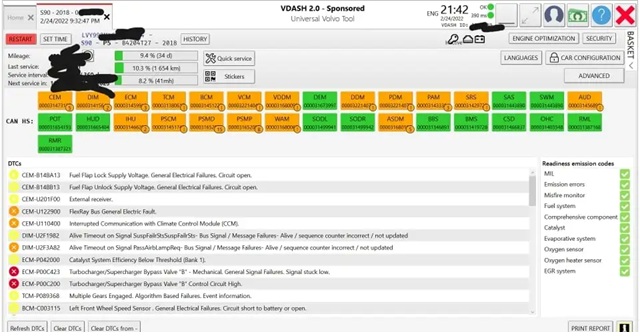
VDASH from D5T5 is pretty much the answer. It is as close as you can get to Vida for SPA/CMA platform cars, there are a few alternatives, but they are not as well rounded and despite Vdash UI from the school of unituituvity, its actually the best.
Is it close to Vida…well no, not really to be honest but that doesn’t stop it being a really quite remarkable piece of software and no other 3rd party tool comes close.
Whilst Vdash does have its shortcomings, it is a continually developing project that never stops improving and expanding.
And to contradict myself, Vdash can do things that main dealer Vida can’t even dream of, more on that later.
But lets not get ahead of ourselves, you just want to be able to maintain your car without having to be lubed up for a visit to Volvo main dealers Right ?
So what can Vdash to to help maintain your car
- Reading and clearing fault codes .
- Resetting service reminders .
- Performing service functions (like parking brake service mode) .
- Live data for diagnosis .
- Calibration routines (not as many as Vida, but its being improved everyday) .
- Advanced CEM configuration (this needs a whole other chapter, but ill provide some information at the bottom) .
- Module cloning (Still quite limited for SPA / CMA at the time of writing) .
OK, so your Sold on Vdash….how do you connect to the car What do you need?
There are 2 methods to connect with Vdash.
- You CAN, but really shouldn’t use a J2534 device like DiCE, Mongoose, SuperJ2534. They are slow (for SPA) and you wont necessarily be able to talk to all modules…but works in a pinch .
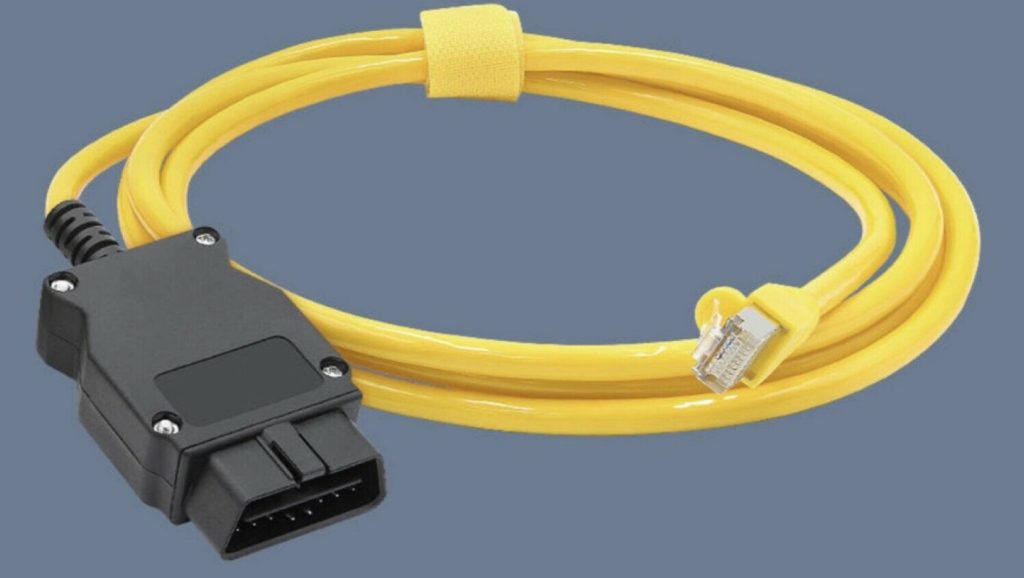
- DOIP – SPA/CMA platform use the industry standard Diagnostics over Internet Protocol. This is also know as VOE (Volvo over ethernet….Vida over ethernet? can’t remember) .
DOIP / VOE cables are essentially a Ethernet connector at one end and OBD2 connector at the other end. They look like this and can be purchased here :
Your laptop must have a built in Ethernet port or you can use a USB ethernet adapter.
Some interesting things of Note, your ethernet adapter must be set to DHCP , not a fixed ip address…but, DOIP itself does not use an IP address in the way you might expect. It relies on broadcast messages.
There is no DHCP server to assign your ethernet connection an IP address, it gets a self assigned ip address like 169.254.10.5, this is normal and correct, it wont work if it is set to 192.168.1.23 (it MUST NOT BE AFIXED IP ADDRESS)
Let talk about some more advanced stuff …CEM configuration and retrofits.
First things first, if your SPA/CMA platform volvo has the “Sensus” infotainment you will need your CEM pin code to make any changes with Vdash.
If your car is the later (2022ish) SPA/CMA wirth Android Auto infotainment you will need you CEM AND VGM pin code to make any changes with Vdash.
Unlike older platforms, there isnt a sure fire and convenient brute force decode method available for getting pin codes, you pretty much have to talk to a Vdash pro like myself.
Why do i need my Cem pin code?
Say you want to retrofit the Bower and Wilkins audio system, you need to change the cars configuration to tell it that the relevant hardware is now installed.
Want to remove the 112mph speed limiter….CEM pin code.
Disable Start Stop…Cem pin code.
Your starting to get the picture now.
However Volvo are Dicks. with a capital DICKS
If your configuration changes are detected by Volvo’s systems your VIN will be black listed, Possibly any warranty voided and all access to future repairs with Volvo blocked.
How can they tell ?
With the older sensus infotainment cars, if the car is connected to main dealer Vida either at a main dealer or at an independant, it is immediately flagged and blocked.
With the Android auto cars, just accepting an over the air software update will trigger it and the update will fail. That’s right, you can be blocked by Volvo on your own driveway.
Say you go into get a spare key programmed…BLOCKED..and no key.
Say you have a critical module fail and your car is towed to volvo for repairs…..it can’t be repaired.
MEGA DICKS!
What can you do?
- Revert your car back to factory standard before allowing Vida to be connected or accepting an OTA update.
- Revert software AND hardware. I have heard of people who left the B&W amp plugged in and just reverted the software being blocked.
I’ve been black listed, what now?
All is not lost, its not permanent. Make an appointment with a service representative to have them asses your car to get it unblocked. It will of course have to be in factory original condition software and hardware.
I did make a guide on how to recert the car back to factory some time ago. See HERE
Don’t forget about Orbit! It doesn’t edit the car’s as-built config, so much safer dealer-wise than VDash for modifications. Also better for per-module stuff like air suspension calibration.
Hi could you point me in the right direction as to Vida on a newer laptop